

08 Dec How to Stop Lateral Movement After a Phishing Attack? runZero on Blocking Network Breaches
Every cybersecurity professional knows this truth. It is rarely said out loud, but in practice, attackers will sooner or later gain access to the network. This may happen through a sophisticated phishing campaign, stolen credentials, or a simple configuration flaw. However, the real threat begins only when the attacker starts moving across the environment.
And this is where the key question arises:
How can you stop lateral movement in the network before an incident turns into a catastrophe?
It is lateral movement that is responsible for most incident escalations — from ransomware to data breaches. Attackers do not want to remain on a single compromised device. Instead, they look for paths leading to servers, backups, Active Directory, or web applications.
ChatGPT powiedział:
Visibility Is the Foundation: 60% of the Network Is Invisible to Traditional Tools
The runZero team shows that, on average, 60% of the attack surface consists of devices that organizations cannot see at all — unmanaged endpoints, IoT and OT devices, and shadow IT.
Without full asset inventory, it is impossible to effectively stop lateral movement in the network.
The Most Common Internal Exposures That Enable Lateral Movement
runZero identifies five key areas that most often open the door to lateral movement:
1. File Servers and Backups
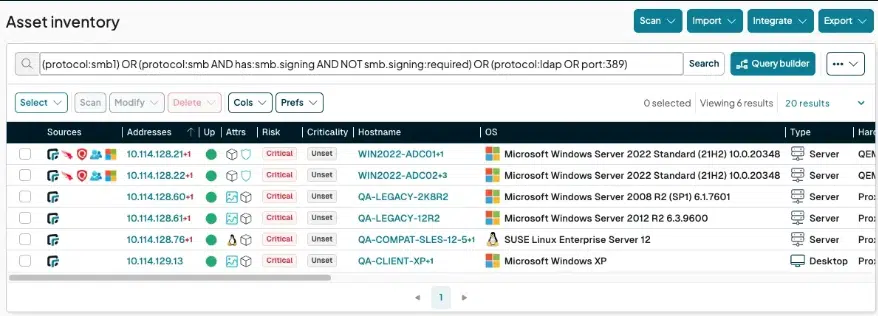
Legacy protocols (SMBv1), lack of SMB signing, and clear-text LDAP — all of these allow attackers to “jump” between resources in seconds.
2. Open Databases
MongoDB, Redis, and Cassandra are often exposed without authentication. This is the fastest path to data leakage.
3. Active Directory
Accounts with non-expiring passwords, misconfigured policies, and inactive accounts — a perfect environment for privilege escalation.
4. Unsecured Web Applications
HTTP logins, default passwords, outdated admin panels — a classic route for lateral movement across the network.
5. Remote Access and BMC
RDP, VNC, TeamViewer, and Internet-exposed IPMI/iDRAC devices give attackers full control over hardware.

How to Stop Lateral Movement in the Network with runZero
Those who act before an incident occurs win — not those who react during one.
runZero enables organizations to:
-
detect unmanaged and invisible devices,
-
identify misconfigurations that enable lateral movement,
-
prioritize risks based on real, not theoretical, threats,
-
see the network through the attacker’s eyes.
As a result, organizations can stop lateral movement before attackers reach critical assets.
Conclusion: The Key Question Is Not “If,” but “What Will You Do When They Are Already Inside?”
In a world where phishing and credential theft are everyday reality, it is no longer enough to simply detect the initial breach. What truly matters is stopping lateral movement.
runZero provides full visibility across the environment and helps close attack paths before they turn into real incidents.
Want to See What’s Really Inside Your Network?
Contact Kappa Data — we will show you how runZero helps stop lateral movement and build true cyber resilience from within.